


CommonSpirit - AR/GA/KY/TN/TX
4.2134.00 Reviews
App Specs
- Version
- 11.5.2
- Updated On
- License
- Free
- Downloads
- 10,000+
- Developer
- CommonSpirit Health
- Categories
- Medical
- Platform
- Android
Screenshots
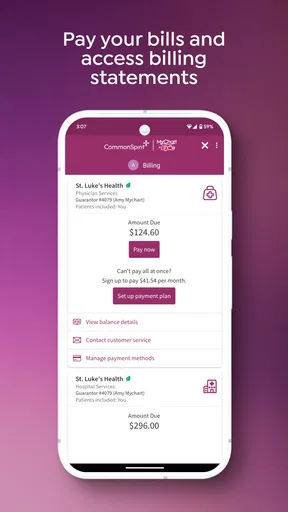
 Analysis by AppCompare
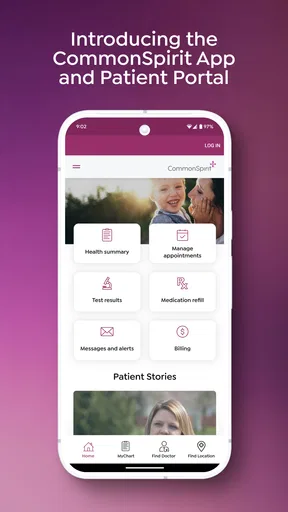
I judge a healthcare app less by how much it claims to do than by whether I can find the right information when I’m tired, worried, or short on time. That is the useful way to approach CommonSpirit - AR/GA/KY/TN/TX: as a medical app from CommonSpirit Health intended to bring a patient’s care-related information and communication into one place. Its value depends on whether you already receive care through the CommonSpirit services it supports, not simply on whether you want a general health tracker.
Readable screens matter most on stressful days
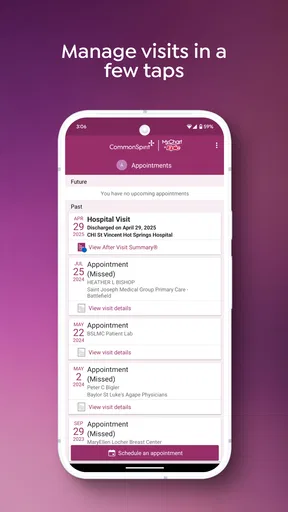
For me, the strongest accessibility question is practical: can I get to the detail I need without having to remember which website, message thread, or paper handout contains it? An app that gathers visit details, health information, and messages can reduce that searching, especially when I am checking something shortly before an appointment. It is still worth taking a moment to learn the layout while things are calm, rather than trying to work it out for the first time when I am anxious.
Clear navigation is helpful, but a clean-looking screen is not automatically easy for everyone. People who use larger text, screen magnification, a screen reader, or other device settings should try the tasks they rely on most: opening a message, finding a recent visit, and moving between sections. I would not assume every screen behaves identically with every accessibility setting. If a label is unclear or an item is difficult to reach, asking the care team about another way to get that information is a sensible backup, not a failure to use the app correctly.
Less searching, but still a few steps
A patient portal can make routine admin feel less scattered, but it does not remove every bit of effort. You still need to sign in, recognize the right section, and interpret the information you find. If you help a family member manage appointments, it is useful to agree in advance on what you are helping with and how they want private health details handled. A shared phone or an unlocked screen can create awkward exposure even when an app is designed for secure access.
One small habit I recommend is checking messages and visit information before you are in a noisy waiting room or rushing between errands. That gives you time to read carefully, make a note of questions, and avoid trying to manage sensitive details in a setting where someone can glance at your screen. The app is best treated as a convenient route to care-related information, not as a substitute for asking a clinician to explain anything that is unclear.
Useful in context, not a universal health toolkit
This is not the same kind of tool as a general wellness tracker or an app that records exercise, meals, or symptoms across unrelated providers. Its appeal is narrower and more personal: it is most relevant when your care is connected to CommonSpirit Health and you want a digital way to keep up with that relationship. If your care is spread across organizations, you may still need other portals or records, so I would not expect one login to become a complete picture of every part of your health.
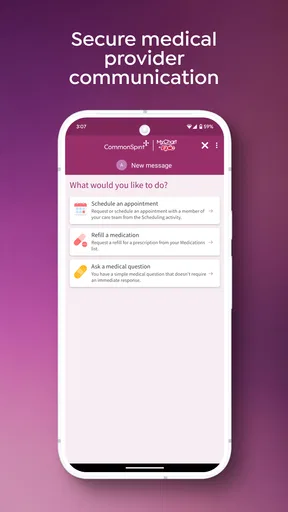
That distinction also helps set expectations about urgent situations. A portal is useful for routine communication and reviewing information, but I would not rely on it for an emergency or assume a message will be seen immediately. For urgent symptoms, use the appropriate urgent or emergency care route rather than waiting for an in-app response. For a non-urgent question, the message function can be more convenient than trying to remember it at the next visit.
Worth Reading Before You Choose

Flipboard Shows What News Apps Must Do Beyond the Feed

Switching to Android Auto Means Rethinking Your Driving Routine

Google Calendar Makes a Crowded Week Easier to Manage

Ludo King Makes the Most of the Minutes Between Plans

Baby Panda World Brings Quick Play to Modern Phones, but Its Game Library Feels Busy

ESPN’s Live Game View Makes Following Close Games Easier
Who is likely to get the most from it
I can see this being a good fit for someone who already receives care in the regions named in the app, prefers handling routine health admin on a phone, and wants visit information and messages easier to revisit. It may also help a caregiver who has permission to assist a patient and needs a simple routine for keeping track of what to ask at the next appointment. Before relying on it, I would confirm that the relevant clinic and care team use the same portal workflow.
On the other hand, if you are outside the service area, do not receive care through CommonSpirit, or want one app to organize records from many unrelated providers, this is probably not the right starting point. A broader records tool or the individual portals used by your clinicians may suit that situation better. I would also avoid choosing it solely because it is free; the real question is whether it connects to the care you actually receive.
What to check before making it part of your routine
When a portal is new to me, I start with low-pressure tasks: sign in, locate a recent visit, and see where messages appear. If a detail looks unfamiliar, I write down the question rather than drawing a medical conclusion from a screen. For an appointment, I would check the information beforehand and keep any questions in a separate note on my phone or on paper. That simple split makes it less likely that I will forget what I wanted to ask while navigating the portal.
If you are setting it up for someone else, make sure the patient is comfortable with the arrangement and understands who can see what on the device. A caregiver’s help can make digital health tasks easier, but privacy and consent still matter. Likewise, people who find small touch targets or multi-step sign-in tiring may prefer to use the app for occasional checks and keep a phone number or printed instructions handy for tasks that become frustrating.
CommonSpirit - AR/GA/KY/TN/TX is a free medical app for everyone, and it has a 4.1 average from around 200 ratings. It has passed 10,000 installs, with its current release listed as version 11.5.2; it was released on May 28, 2025, and runs on Android 9 or later. Those details make it easy to try, but they do not tell me whether the portal will match a particular clinic’s workflow, so I would check that connection before depending on it for regular care.
Getting Started with Ease
The first thing I noticed about CommonSpirit - AR/GA/KY/TN/TX is how user-friendly it is right from the get-go. Setting up an account was a breeze. I mean, who has time to mess around with complicated registration processes, right? Just a few taps, and I was in. The app's interface is clean and intuitive, making navigation feel like a walk in the park.
Features That Stand Out
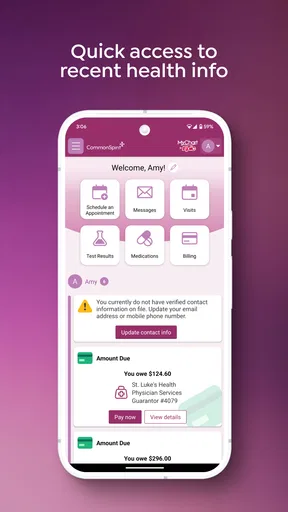
What really caught my attention were the features packed into this app. It's like having a personal healthcare assistant right in your pocket. Whether it's scheduling appointments, accessing medical records, or even consulting with a healthcare professional, it's all there at your fingertips.
One feature that deserves a special mention is the real-time chat with healthcare providers. It's not just a random chatbot; you actually get to talk to real humans. I had a few queries about a recent test, and the response was prompt and genuinely helpful. It's like having a direct line to your healthcare team without leaving your couch.
Access to Medical Records
In the age of digital everything, having access to your medical records shouldn't be a hassle. With this app, I was able to view my medical history, lab results, and even prescriptions with just a few taps. It's all securely stored in one place, and the peace of mind that comes with that is priceless.
Appointment Scheduling Made Easy
Scheduling an appointment has never been so straightforward. The app offers a streamlined process where you can select your preferred healthcare professional, choose a convenient date and time, and voila, you're all set. No more waiting on hold or dealing with complicated phone menus. It's all about convenience here.
Security You Can Trust
Now, I know what you're thinking: "Is my information safe?" The app takes security seriously, with strong encryption and strict privacy protocols. I felt confident knowing that my personal health information was in safe hands. It's like having a digital lock on your private medical details.
Community and Support
What's also cool about this app is the community aspect. There are forums and support groups where you can connect with others who may be experiencing similar health journeys. I found it reassuring to know I'm not alone, and the shared experiences and tips from others were incredibly valuable.
In case you need any technical assistance, the support team is just a tap away. They're friendly, knowledgeable, and eager to help. It's not just about fixing issues; it’s about ensuring you have the best experience possible.
A Few Words of Caution
Like any app, there are a few quirks. Occasionally, I noticed minor lags when loading medical records or booking appointments during peak times. It's not a dealbreaker, but something to be aware of. Hopefully, future updates will iron out these wrinkles.
Also, while the app is comprehensive, it currently serves specific regions. So, if you're outside of Arkansas, Georgia, Kentucky, Tennessee, or Texas, you might have to wait for it to roll out in your area.
My inclusive take
For everyday access, I would use the app to prepare for a visit, review details afterward, and keep routine questions from getting lost in scattered notes. A realistic example is checking a recent visit while planning the week, then writing down a question about a result to raise with the care team. That is where a portal can save effort: it keeps the information close to the conversation, while leaving clinical interpretation to the clinician.
My recommendation is conditional rather than universal. If CommonSpirit is part of your care and the app works with the way you read, tap, and sign in, it can make routine follow-up feel more manageable. If your clinic is not connected, if you need a single cross-provider record, or if you cannot comfortably navigate the interface with your preferred device settings, a phone call, in-person assistance, or another provider’s portal may be the better route. I would treat accessibility as something to test with your own tasks, not assume from a tidy design.
In conclusion, CommonSpirit - AR/GA/KY/TN/TX is a powerhouse for managing healthcare on the go. From its user-friendly interface to its robust features, it's a great companion for anyone looking to take control of their health journey. With a few tweaks and expansions, it could easily become the go-to app for healthcare management nationwide. So, why not give it a spin and see how it fits into your healthcare routine?
Pros
- User-friendly interface for quick navigation.
- Comprehensive health resources available.
- Seamless appointment scheduling feature.
- Real-time notifications for updates and reminders.
- Secure and easy access to medical records.
Cons
- Limited customization options for users.
- Occasional lag during peak hours.
- Some features require stable internet.
- Limited offline functionality available.
- Support response can be slow at times.
FAQs for CommonSpirit - AR/GA/KY/TN/TX
What features does the CommonSpirit app offer for users in AR, GA, KY, TN, and TX?
The CommonSpirit app provides users with a range of features designed to enhance healthcare access and management. These include appointment scheduling, access to medical records, telehealth consultations, and notifications for upcoming health checkups. The app also offers personalized health tips and a directory of local healthcare providers to ensure users receive comprehensive care.
Is the CommonSpirit app secure for handling my personal health information?
Yes, the CommonSpirit app prioritizes user privacy and security. It employs advanced encryption protocols and adheres to HIPAA regulations to ensure that all personal health information is securely stored and transmitted. Users can confidently manage their health data, knowing that their privacy is protected at all times.
Can I use the CommonSpirit app to schedule appointments with any healthcare provider?
The app allows users to schedule appointments with participating healthcare providers within the CommonSpirit network in their respective states, including AR, GA, KY, TN, and TX. Users can easily find available providers, view their profiles, and book appointments directly through the app, streamlining the process of accessing healthcare services.
Does the CommonSpirit app offer support for telehealth services?
Yes, the CommonSpirit app supports telehealth services, enabling users to consult with healthcare providers remotely. This feature is particularly beneficial for those who prefer virtual visits due to convenience or health concerns. Users can schedule and conduct video consultations within the app, making healthcare more accessible and flexible.
What should I do if I encounter technical issues with the CommonSpirit app?
If you experience technical issues with the CommonSpirit app, there is a dedicated support section within the app where you can report problems. Additionally, users can contact customer support via email or phone for assistance. The support team is responsive and aims to resolve any issues promptly to maintain a seamless user experience.


